Photo to flashcards
Take a photo of your notes and AI turns them into flashcards. Handwritten or printed. Your first deck is free.
See it work
A page of notes on cell respiration, from photo to a finished deck. Under 20 seconds, no sound.
How it works
- Take a photo of each page. Handwritten notes, a printed handout, a textbook page or a whiteboard. Up to 20 photos in one deck.
- AI reads your writing and writes the cards. Pick Q&A cards (a question on the front, the answer on the back) or cloze cards (a key term hidden in a sentence). Most decks are ready in a minute or two.
- Study or export. Study the cards on the site, or download them for Anki, as a CSV or for Quizlet.
Example
We gave it this page of notes:
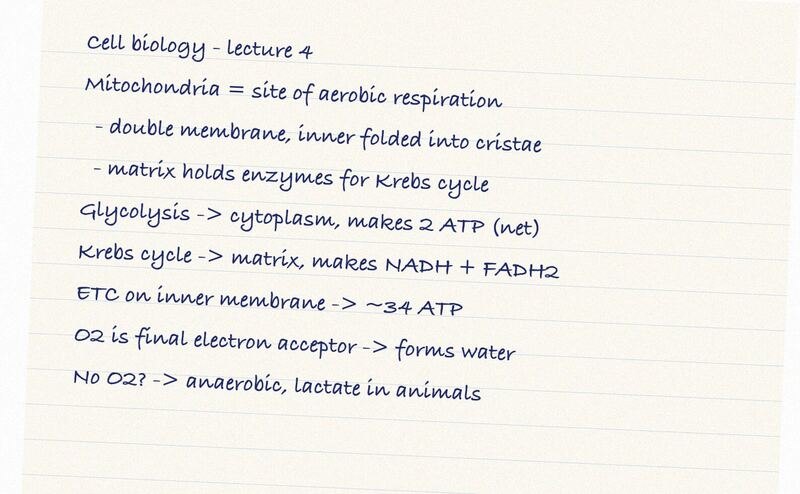
It wrote 21 Q&A cards. Some of them:
- Where does the Krebs cycle occur? In the mitochondrial matrix.
- What is the final electron acceptor in aerobic respiration? Oxygen.
- What is produced during anaerobic respiration in animals? Lactate.
And as cloze cards, with the hidden term in brackets:
- The inner mitochondrial membrane is folded into structures called [cristae].
- Glycolysis produces a net gain of [2 ATP].
Tips for photos it can read
- One page per photo, with the page filling the frame.
- Good light and no shadow from your phone across the page.
- Hold the phone flat above the page so the lines are straight.
- Notes in Goodnotes? Export the pages as images first. The Goodnotes to Anki guide shows how.
- Notes in a PDF already? Use the PDF to Anki converter. Typed notes? Paste them.
Photo to Flashcards FAQs
Can it read handwriting?
Yes. It reads handwritten and printed notes. Faint pencil and very small writing are harder to read, so take those photos closer up and in good light.
How many photos can I add?
Up to 20 photos in one deck, one page per photo. For a longer set of notes, make more than one deck, or scan the pages into a PDF and upload that.
Can I use Goodnotes pages or screenshots?
Yes. In Goodnotes, export the pages as images, then add them here with Choose photos. Screenshots of slides or notes work the same way. The Goodnotes to Anki guide has the export steps.
Does it work on my phone?
Yes. On a phone, Take a photo opens the camera and Choose photos opens your photo library. On a computer, Choose photos lets you pick image files.
Which export formats are there?
Anki (.apkg), CSV, and a tab-separated text for Quizlet's Import box. You can also study the cards on StudyCards AI.
What happens to my photos?
We send your photos to our AI provider to read the notes and write the cards, and save them with your deck. We don't sell them. Deleting your account deletes your decks. The privacy policy has the details.
Is it free?
Your first deck is free, and you don't need a card to sign up. After that, paid plans start at $4.99 a month for 25 decks.
You might also like these tools:
Spaced Repetition Schedule
Review days up to your exam
Flashcard ROI Calculator
See the time savings from using AI flashcards
Anatomy Flashcard Strategy
Create effective anatomy flashcards
Quizlet to Anki Converter
Convert Quizlet sets to a ready-to-import .apkg
PDF to Anki Converter
Upload a PDF, get AI flashcards as an .apkg
PowerPoint to Anki Converter
Upload slides saved as a PDF, get an .apkg
CSV to APKG Converter
Turn a CSV, TSV or TXT file into an Anki deck
Gizmo to Anki Converter
Paste Gizmo cards, download an .apkg
Brainscape to Anki Converter
Turn a Brainscape export into an Anki deck
StudySmarter to Anki Converter
Turn a StudySmarter CSV into an Anki deck
RemNote to Anki Converter
Turn RemNote flashcard syntax into Anki cards
Notion to Anki Converter
Turn a Notion database CSV into an Anki deck
Anki to Quizlet Converter
Turn an Anki .apkg into Quizlet text and a CSV
Ready to take your studying to the next level?
StudyCards AI can automatically generate all the flashcards you need based on your specific needs.