Anki Settings for Med School: The Technical Optimization Guide
Last checked: September 2026
Medical students often abandon traditional lectures for a "parallel curriculum" of commercial resources and Anki, as noted in a PMC (2024) study. This shift is driven by the pressure of licensure exams. StudyCards AI simplifies this transition by automating the card creation process from your notes.
Key Takeaways
- Switch to the FSRS algorithm to replace the outdated SM-2 system and avoid "Ease Hell."
- Set "Maximum reviews per day" to 9999 to prevent a backlog of overdue cards.
- Balance "Desired Retention" (usually 85% to 90%) to avoid exponential workload increases.
- Use a "Knowledge Gap Loop" to connect UWorld mistakes to AnKing cards and personal notes.
- Suspend all cards in pre-made decks initially to control the flow of new material.
The difference between a student who spends ten hours a day on Anki and one who spends five is rarely about intelligence. It is almost always about settings. If you use the default Anki configuration, you will likely fall into "Ease Hell," where cards appear too frequently, and your daily review count balloons into an unmanageable mountain. For typical daily review loads, see our medical student Anki statistics.
The "Parallel Curriculum" and the need for optimization
In modern medical education, there is a growing divide between what is taught in the lecture hall and how students actually study. A PMC article on spaced repetition describes this as a "parallel curriculum." Students are increasingly relying on commercialized resources and pre-made flashcard decks to consolidate knowledge for licensure exams because these tools use evidence-based learning principles.
However, relying on these tools without proper configuration is a mistake. When you download a massive deck like AnKing, you are inheriting thousands of cards. If your settings are not optimized, you will be overwhelmed by the sheer volume of reviews. This is why a dedicated optimization guide is necessary for any student aiming for high scores without sacrificing their mental health.
Technical setup: Step-by-step menu navigation
Many students feel intimidated by the Anki interface because it looks like software from the 1990s. To change your settings, you do not need to be a programmer. You just need to know where the gear icon is. Follow these steps to move from default settings to a medical school optimized configuration. If it still feels like too much, compare these Anki alternatives.
- Open the Anki home screen where your decks are listed.
- Locate the deck you want to modify (e.g., "AnKing Step 1").
- Click the gear icon to the right of the deck name and select "Options."
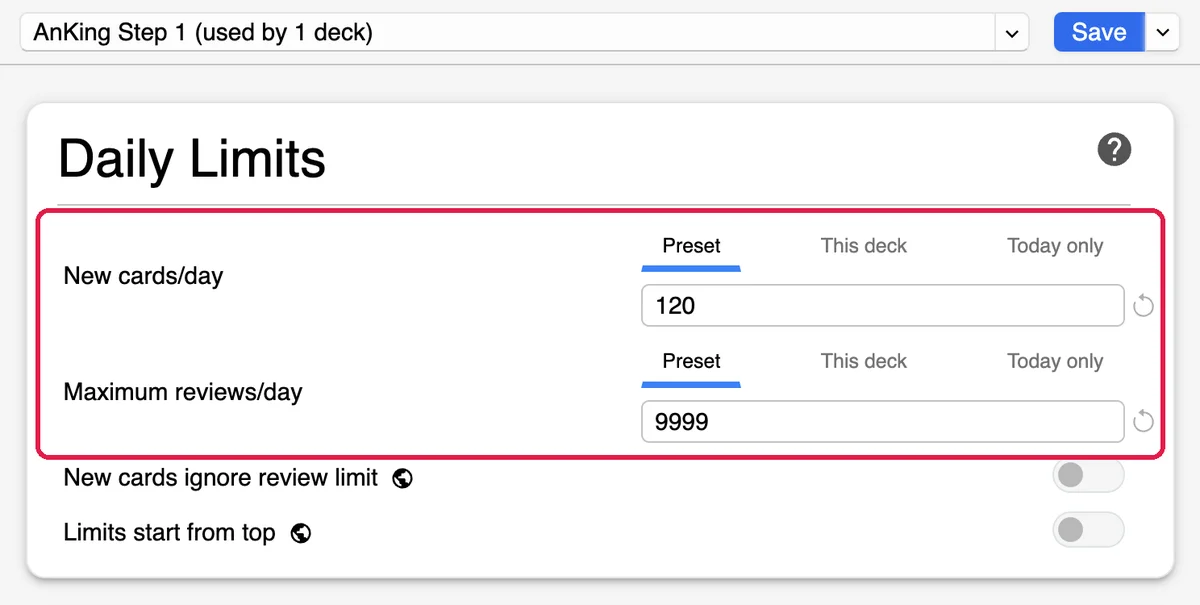
- In the "Daily Limits" section at the top, locate "New cards/day." According to a MedSchoolGurus guide, setting this to 120 is a strong starting point for many.
- In the same section, find "Maximum reviews/day" and change this to 9999. This ensures you never "cap" your reviews, which would otherwise lead to a massive backlog of overdue cards.
- If you are using a pre-made deck, go to the Browser, sort by "Due," and suspend all cards you have not yet seen. This allows you to unsuspend cards only as you cover the material in your lectures or videos.
Once these basics are set, you should look into must-have plugins to improve the visual experience and functionality of the app.
The Anki settings cheat sheet
To make this practical, here is a comparison between the default settings and the optimized settings used by top-performing medical students. While no single setting is perfect for everyone, these are the industry standards for the USMLE path.
| Setting | Default Anki | Med School Optimized |
|---|---|---|
| New Cards/Day | 20 | 100-150 (Adjust to pace) |
| Max Reviews/Day | 200 | 9999 (No limit) |
| Algorithm | SM-2 | FSRS (Free Spaced Repetition Scheduler) |
| Learning Steps | 1m 10m | Customized based on FSRS |
| Desired Retention | N/A | 0.85 to 0.90 |
Deep dive: FSRS and the math of retention
For years, Anki used the SM-2 algorithm. SM-2 relies on a fixed "Ease" factor. Every time you hit "Good," the interval increases by a multiplier. The problem is that if you hit "Hard" too often, the Ease factor drops. Once it drops, the card is scheduled more frequently, which makes you more likely to hit "Hard" again. This is the "Ease Hell" mentioned in Zach Highley's settings guide.
The FSRS scheduling algorithm solves this by using a machine learning model. Instead of a fixed multiplier, FSRS looks at your actual history with a card to predict when you will forget it. This is a significant improvement because it reduces the total number of reviews while maintaining the same level of retention.
Understanding Desired Retention
The most important setting in FSRS is "Desired Retention." This is a percentage (expressed as a decimal, like 0.90) that tells Anki how much of the material you want to remember. It sounds simple, but the math is punishing.
If you set your retention to 0.95 (95%), you are telling Anki you only want to forget 5% of your cards. To achieve this, Anki must show you the cards much more frequently. Moving from 90% to 95% retention does not just increase your workload by 5% (it can nearly double the number of daily reviews). For most medical students, a retention rate of 0.85 to 0.90 is the sweet spot. It provides a high level of knowledge while keeping the daily review count sustainable.
Clinical application: The Knowledge Gap Loop
Settings are only half the battle. The other half is how you integrate Anki into your actual studying. Many students make the mistake of treating Anki as a standalone activity. They "do their cards" and then "do their questions" as two separate events. This is inefficient. Instead, you should use what is called the Knowledge Gap Loop.
Here is a concrete example of how this works in a clinical context. Imagine you are practicing questions on Hyperkalemia in UWorld. You miss a question because you did not realize that Calcium Gluconate does not actually lower potassium levels (it only stabilizes the cardiac membrane).
- Identify the Gap: You realize you have a conceptual misunderstanding of the mechanism of Calcium Gluconate.
- Locate the Source: You search your USMLE Step 1 decks for "Hyperkalemia" and find the corresponding card.
- Analyze the Card: You find the card, but it simply asks "What is the first step in treating Hyperkalemia?" and the answer is "Calcium Gluconate." This card is too simple (it is a rote memorization card) and did not prevent you from missing the UWorld question.
- Create a Personal Card: You create a new, personal card that asks: "Why is Calcium Gluconate given first in hyperkalemia despite not lowering K+ levels?" Answer: "To stabilize the cardiac membrane and prevent arrhythmias."
By doing this, you are transforming Anki from a memorization tool into a conceptual tool. This approach is one of the best study techniques for medical students because it ensures you are studying the things you actually do not know, rather than wasting time on cards you have already mastered.
Managing the backlog and avoiding burnout
Even with the best settings, you will eventually face a backlog. This happens during clerkships or when you take a few days off. The psychological weight of seeing "2,000 reviews due" can lead to total avoidance. To handle this, you must change your mindset about the "Due" count.
First, understand that a card that is 10 days overdue is not significantly harder to remember than a card that is due today. The most important thing is to clear the backlog. You can use the "Filter" function to create a custom deck of overdue cards and tackle them in small batches. According to the MedSchoolAnki FAQ, focusing too much on rote memorization of random facts can lead to burnout. The key is to prioritize cards that relate to your current clinical rotation.
If you find that you are spending too much time manually creating these personal cards, you are at risk of burnout. This is where automation becomes necessary. You can find more on avoiding Anki burnout by reducing the friction of card creation.
How StudyCards AI fits in
The biggest bottleneck in the "Knowledge Gap Loop" is the time it takes to create high-quality cards. Manually typing out nuances from a textbook or a PDF is tedious and takes away from actual study time. StudyCards AI solves this by converting your PDFs and notes into AI-generated flashcards that you can export directly to Anki. Instead of spending an hour making ten cards, you can generate them in seconds and spend that hour actually reviewing them and doing practice questions.
"I used to spend my entire Sunday just making cards for the upcoming week. It felt like a data entry job, not medical school. Using StudyCards AI to turn my lecture PDFs into Anki cards saved me about 10 hours a week, which I now use for UWorld."
- Sarah J., M2 Student