Anki Settings: The Complete Optimization Guide (2026)
Last checked: October 2026
The best Anki settings for most people: turn on FSRS, set desired retention to 0.90, use one learning step shorter than a day (such as 10m), leave maximum reviews per day uncapped, and start at 10 to 20 new cards a day. Expect about 10 reviews a day for every new card a day: the Anki manual says 20 new cards a day leads to roughly 200 reviews a day.
Sources: Anki manual, deck options and the FSRS tutorial
Here are the settings to change, what each one does, and the values the Anki manual and the FSRS developers recommend.
Step 1: Switch to FSRS
FSRS (Free Spaced Repetition Scheduler) has been built into Anki since version 23.10, but Anki still uses the older SM-2 scheduler unless you turn FSRS on. FSRS learns from your own review history. Its tutorial says it "can prevent many of the unnecessary reviews that happen when using SM-2", which tends to show new cards again too soon.
How to enable FSRS:
- 1. Open a deck → click the gear icon → Options
- 2. Scroll down to the "FSRS" section, below "Display Order"
- 3. Toggle "FSRS" on. This turns it on for all your decks.
- 4. Click "Optimize Current Preset" to calibrate FSRS to your review history
- 5. Set desired retention to 90% (0.90)
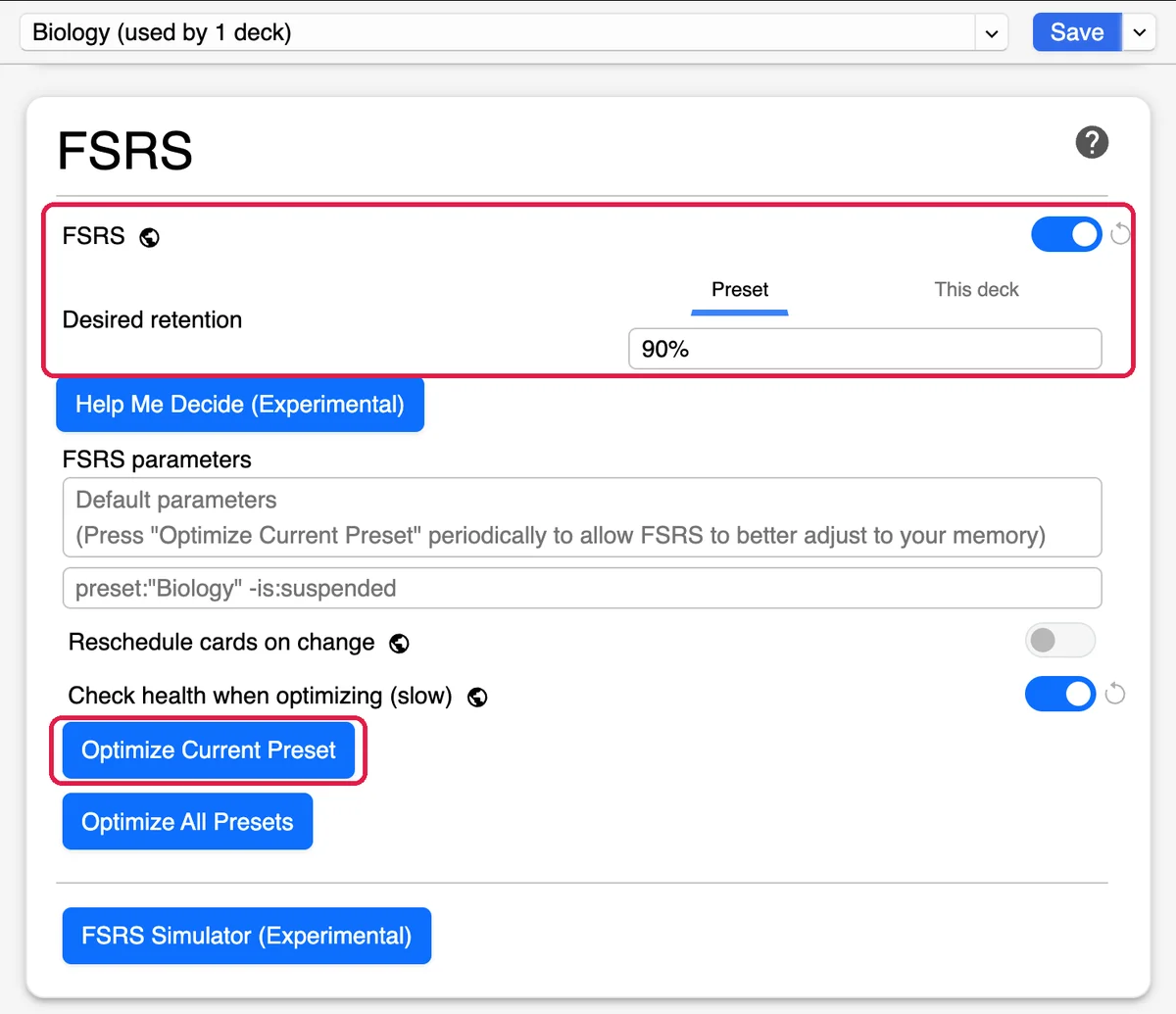
Requires Anki 23.10 or later. The FSRS tutorial says 80 to 95% retention is reasonable and 90% works for most people. Higher targets add a lot of reviews. For the research behind a 90% target, see our spaced repetition statistics.
Tuning settings only pays off once you have cards to schedule. If making cards is the slow bit, StudyCards turns a PDF or your notes into an .apkg you import into Anki the normal way.
Exports a native .apkg. No credit card.
Learning steps
Learning steps set how many times you see a new card on the day you learn it before it moves to the review queue. With FSRS, the Anki manual says every learning and relearning step should be shorter than 1d, so you can finish it the same day. FSRS then schedules the next-day review itself.
| Setting | Value | Best for |
|---|---|---|
| Learning steps (FSRS) | 10m | Most learners. The FSRS tutorial suggests a single step of 10m, 15m, 20m or 30m. |
| Learning steps (default) | 1m 10m | Fine with FSRS too, since both steps are under a day |
| Learning steps (SM-2 only) | 1m 10m 1d | If you stay on SM-2 and want a next-day check before a card graduates. Don't use a 1d step with FSRS. |
New cards per day
This is the setting most beginners get wrong. Each new card keeps coming back for reviews, so your daily review count grows for weeks after you raise this number. The Anki manual's rule of thumb: 20 new cards a day leads to roughly 200 reviews a day. If you use Anki on your phone as well, see how to set up Anki on mobile.
Recommended: 10 to 20 new cards/day (beginners)
Start at 10 if you're new to Anki, which means roughly 100 reviews a day once it settles. Raise it only when your reviews feel easy to finish.
For heavy users: more than 20 new cards/day
If you are working through a big deck like AnKing, you may want more. By the same rule of thumb, 50 new cards a day means several hundred reviews a day. If you use FSRS, the simulator in deck options (Anki 24.11 and later) shows your future workload before you commit.
Warning: Do not set to 9999
Some users set this to 9999 to see all new cards at once. You will learn them all on one day and then face all their reviews together. Keep it at a number you can keep up every day.
Maximum interval
The maximum interval caps how long Anki can wait before showing you a card again. The default is 36,500 days (100 years), which suits long-term learning.
If you are studying for one exam, you can lower it so no card disappears past the exam date: set it to the number of days left until the exam.
SM-2 settings: graduating interval, easy interval and starting ease
These only matter if you stay on SM-2. With FSRS turned on, Anki hides the SM-2 options such as graduating interval and easy bonus, because FSRS sets intervals itself.
| Setting | Default | Recommended | Why |
|---|---|---|---|
| Graduating interval | 1 day | 1 day | Fine as-is |
| Easy interval | 4 days | 4 days | Fine as-is |
| Starting ease | 250% | 250% | Fine as-is |
Never press Hard when you forgot
Hard is a pass, not a fail. Press Again whenever you forgot the answer, and Hard, Good or Easy only when you remembered it. The Anki manual says FSRS "can adapt to almost any habit, except for one: pressing "Hard" instead of "Again" when you forget the information."
Recommended settings summary
# Set these in your deck options:
FSRS: Enabled
Desired retention: 0.90
Learning steps: 10m (or the default 1m 10m)
Relearning steps: under 1d, such as 10m
New cards/day: 10 to 20 (start low)
Maximum reviews/day: 9999 (no cap)
Maximum interval: 36500
Bury related new cards: Off
Bury related review cards: Off
Managing the review backlog
Capping "Maximum reviews/day" at a small number, like 100, feels manageable, but the cards over the cap don't go away. They become overdue and pile up. For most people, especially on FSRS, leave it at 9999 so you see every card that is due.
The Display Order section of deck options controls the order you see cards in:
- New/review order. Show new cards mixed in with reviews, before them, or after them. "Show after reviews" means you finish what's due before adding anything new.
- Review sort order. The options include "Due date, then random" and, with FSRS, "Ascending retrievability", which shows the cards you are most likely to forget first. That helps when you are clearing a backlog.
- If you fall behind. Set new cards to 0 until your daily reviews are back to a level you can keep up.
If daily reviews are wearing you down, some students end up switching to AI-powered flashcard tools.
Leeches: when settings aren't enough
Some cards won't stick whatever your settings. When you forget a card 8 times, Anki tags it as a leech and suspends it (Anki manual). A card usually becomes a leech because it asks too much at once or lacks context. Fix the card rather than the settings:
- Split it. Break one complex card into several cards that each ask one thing.
- Add context. Add an image, a mnemonic or an example to the "Extra" field.
- Suspend it. If you no longer need it, leave it suspended.
Card quality
Settings can't fix a vague card. A card that asks one clear question with one answer is easier to grade honestly, so FSRS gets better data to schedule from.
- Avoid lists. Instead of one card asking for five things, make five cards.
- Use cloze deletions. In a long sentence, hide only the piece you keep forgetting.
- Keep them quick. If a card regularly takes more than a few seconds to answer, consider splitting it.
You can also generate your Anki cards with AI and then edit them. Check each card before you study it.
Don't have Anki cards yet?
How to create Anki cards covers card creation from scratch. You can also export AI-generated cards to Anki from your own notes. Coming from Quizlet instead? See how to convert Quizlet to Anki.
Settings only matter once you have cards to put through them. StudyCards turns a PDF or a page of notes into an .apkg you can import into Anki in one click.
Exports a native .apkg. No credit card.