Anki Settings for Exam in 1 Week
Last checked: October 2026
For an exam in 7 days, set New cards/day to your total cards divided by 5, so you finish new cards on day 5 and keep days 6 and 7 for review. Set Maximum reviews/day to 9999 and Maximum interval to the number of days left, so no card is scheduled after the exam. Keep learning steps short: 1m 10m is fine on any scheduler.
Anki's defaults are built for remembering things for years. With seven days, you want every card seen at least once and reviewed again before the exam. Below are the settings and a day-by-day plan. For why cramming still loses to spacing over the long run, see our spaced repetition statistics.
Why short intervals help this week
Forgetting is fastest right after learning. In Ebbinghaus's own experiments, relearning a list an hour later needed about half the original work, and a day later he saved only about a third of it (Memory, chapter 7; see also our memory retention statistics). So review each new card again within a day.
It also helps to mix topics in one session (interleaving) instead of finishing one topic before starting the next, so you practise telling similar ideas apart. For how a week of cramming compares with spacing over months, see cramming versus spaced repetition.
Technical implementation: click-by-click guide
Change these in your deck options. You can find these by clicking the gear icon next to your deck and selecting "Options".
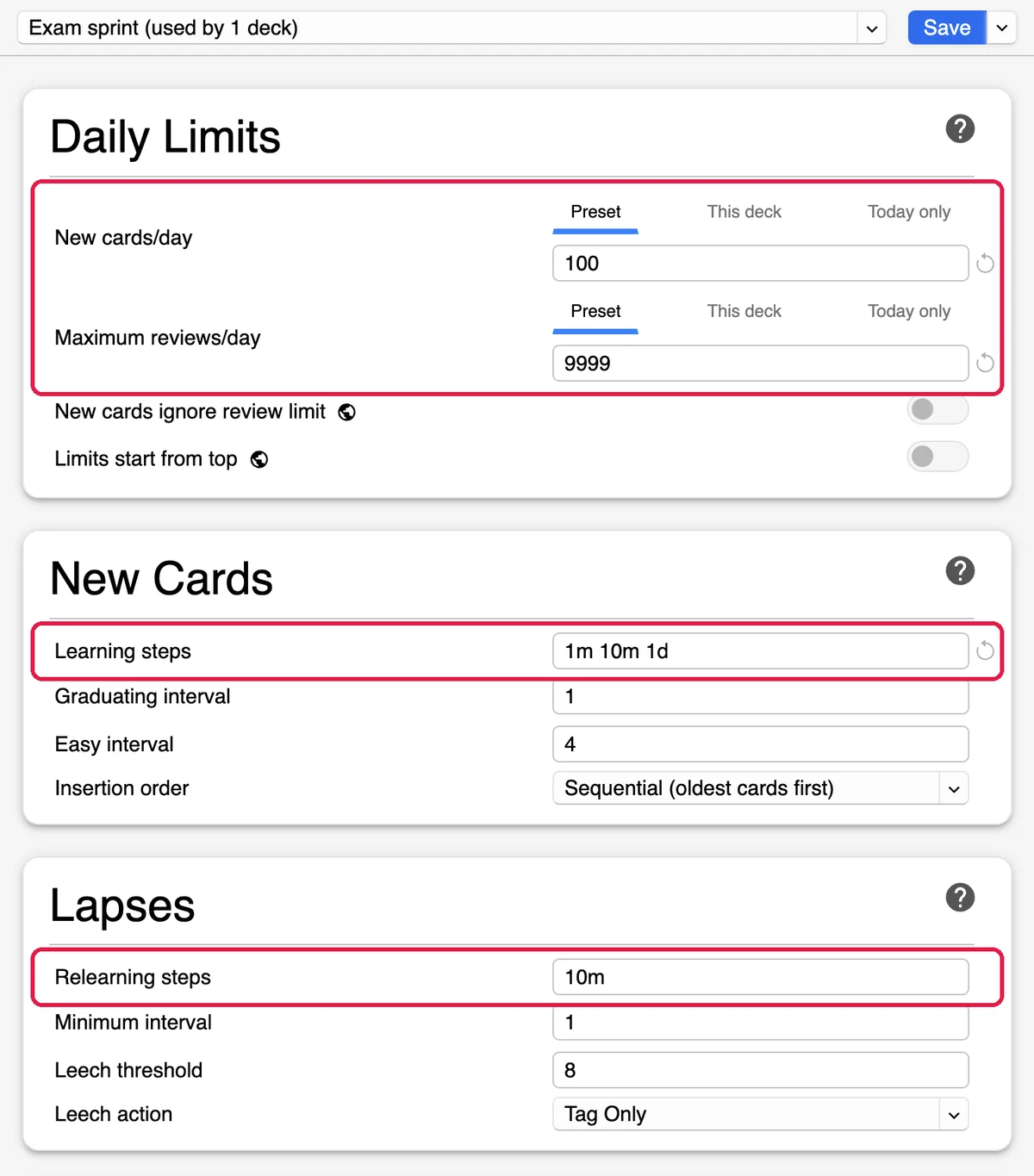
1. New cards and daily limits
Work out "New cards/day" from your deck size. Anki's old support article on large exams says to divide your total cards by your study days, after setting aside 14 to 30 days at the end for review. With one week you can't set aside that much, so divide by 5: new cards on days 1 to 5, review only on days 6 and 7.
- New cards/day: total cards / 5. If you have 600 cards, set this to 120.
- Maximum reviews/day: 9999. Never cap your reviews during an exam sprint. If you cap them, due cards get left for later and pile up.
- Maximum interval: the number of days until the exam. Then no card is scheduled for after the exam.
2. Learning steps (the rapid loop)
Learning steps set how often you see a new card on the day you learn it. The default is 1m 10m, and either scheduler then brings the card back the next day.
- If you use FSRS: keep 1m 10m, or one step such as 10m. The Anki manual says every step should be shorter than 1 day with FSRS. FSRS is on or off for all your decks at once, so don't switch it off just for this exam. See the FSRS algorithm for how it schedules.
- If you use the older SM-2 scheduler: you can use 1m 10m 1d, which adds a check the next day before the card graduates.
3. Lapses and intervals
When you forget a review card (a lapse), Anki shows it again in relearning steps. These settings are in the Lapses and Advanced sections:
- Relearning steps: 10m. You see a forgotten card again 10 minutes later.
- New interval (SM-2 only): leave it at the default 0. In a one-week sprint, cards rarely reach intervals long enough for it to matter: with the default minimum interval of 1 day, a forgotten card comes back the next day either way.
For a comprehensive look at these variables, see the complete optimization guide.
Scenario-based strategies
How you work depends on how many cards you have.
Scenario A: The Low Volume Sprint (Under 1,000 cards)
With a smaller deck, you have time for Basic (front/back) cards and for practice questions alongside Anki. Press Again whenever you forget, so weak cards come back.
Scenario B: The High Volume Sprint (Over 3,000 cards)
Thousands of cards in seven days means hundreds of new cards a day, so cut what is least likely to be tested. Cloze deletions are quick to make from your notes and each one tests a single fact. If you are in this position, you might need emergency exam prep tactics to filter out low-priority cards.
Keep moving. If you don't know a card after a few seconds, press Again and go on.
Card types for speed: Cloze vs Basic
Basic cards ask a question and show the answer. Cloze deletions hide one part of a sentence, so you answer with the rest of the sentence as context. Cloze cards are quicker to make from notes you already have.
- Use Basic cards for: Core definitions, formulas, and high-level concepts.
- Use Cloze cards for: Lists, anatomy, dates, and complex sentences.
The 7-day rapid review calendar
Spread the new cards evenly so you don't overload one day.
- Day 1: The Foundation. Import all cards. Set your "New cards/day" to total / 5. Complete all new cards and all reviews. Focus on understanding the context of each card.
- Day 2: The Momentum. Complete the second batch of new cards. Expect a jump in reviews as Day 1's cards come back. Do not skip them.
- Day 3: The Grind. Complete the third batch of new cards. You are now more than halfway through. If you feel overwhelmed, use Anki add-ons to help track your progress or speed up the interface.
- Day 4: The Push. Complete the fourth batch of new cards. Look for cards you keep missing. If a card is too hard, rewrite it or simplify the cloze deletion.
- Day 5: The Finish Line. Complete the final batch of new cards. By the end of today, you should have seen every single card in your deck at least once.
- Day 6: The Filtered Sweep. No new cards today. Create a "Filtered Deck" with the search term
is:due. This pulls all cards that are due for review into one place. Spend extra time on the cards you keep missing. - Day 7: The Final Polish. Use a Filtered Deck with the search term
prop:due<=1. This shows you everything due today and tomorrow. Do a final sweep of your most difficult cards, and get a full night's sleep before the exam.
Advanced tactics for the final 48 hours
In the last 48 hours, switch from new material to reviewing what you have.
To review the whole deck regardless of due dates, create a filtered deck (or use Custom Study → "Study by card state or tag") and turn off "Reschedule cards based on my answers". The Anki manual calls this preview mode: the cards go back to their normal schedule afterwards. A full pass shows up cards you only guessed right earlier.
Mix your subjects too. If you are studying biology and chemistry, don't do all the biology and then all the chemistry. You can achieve this by studying from a "Parent Deck" that contains both subjects.
If you find yourself running out of time, you can build a finals survival kit by studying only the topics most likely to come up.
How StudyCards AI fits in
With a week to go, days spent making cards are days not spent reviewing them. StudyCards AI turns your PDFs and notes into Anki cards, so you can start Day 1 of the plan straight away. Check the cards as you study them.
Try StudyCards AI Free